
Epic Progress Bar for Jira
Know exactly how far through your epic you really are
Get it on the MarketplaceVersion 1.6.0·Updated Nov 21, 2026
Overview
What it does
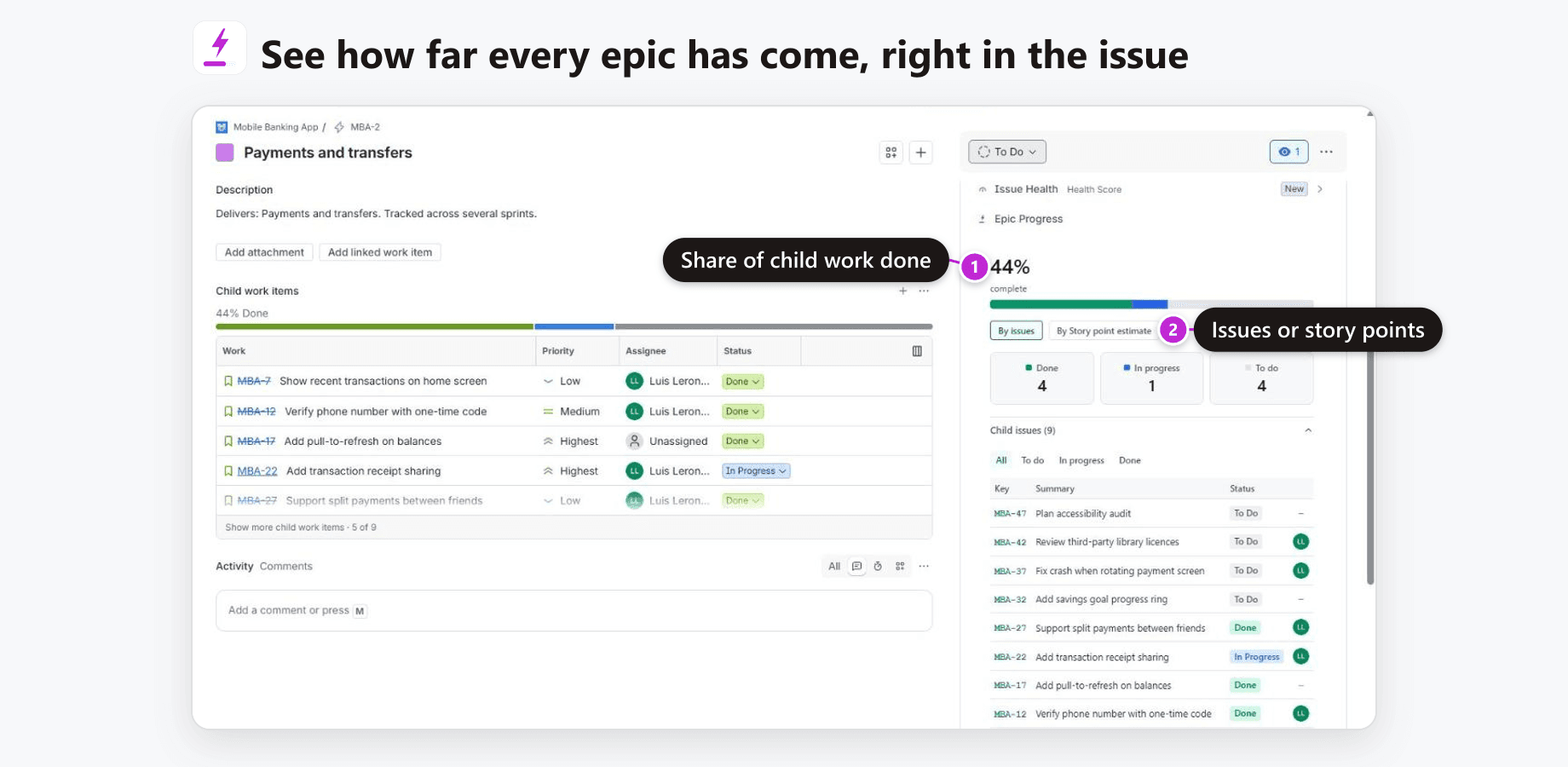
Epics sit at the top of your Jira hierarchy but give you almost nothing in terms of progress visibility. Epic Progress Bar adds a segmented visual progress bar directly to every epic issue, breaking down child issues into done, in progress, and to do, with a percentage and a full child issue table below. No more clicking into every linked story to figure out where the epic stands. Programme managers and team leads get the status they need without interrupting developers, and the breakdown makes it obvious where the bottlenecks are.
Inside the app
- Segmented progress bar showing the done, in-progress, and to-do split as a visual percentage
- Breakdown cards with exact counts for each status category
- Child issue table listing every linked story with current status and assignee
- Completion percentage calculated automatically from live child issue data
- Progress by story points as well as by issue count, using whichever points field your project uses
- Read-only. Install it and it works on every epic straight away
In action
See it on screen
Get started
Up and running in a few minutes
Step 1
Install from the Marketplace
Select Get it now on the Atlassian Marketplace listing, pick your Jira site and confirm. There is nothing to configure.
Step 2
Open an epic
Open the Epic Progress section in the sidebar of any epic.
Step 3
Read the bar
See To Do, In Progress and Done, with the percentage complete.
Step 4
Switch to story points
Measure progress by estimate instead of issue count, then check the child issues below.
Like Epic Progress Bar for Jira, but need it to fit your company?
We can build a private version just for you, changed to match how your teams work and installed only on your Atlassian site.
Ask about a custom build- Your fields, workflows and rules
- Your wording, defaults and reports
- A private build, only on your site
- Supported by the people who built the app
Updates
What's new
- v1.6.0Latest
The "by estimate" view now uses the field your project actually estimates in, so sites with two estimate fields no longer read the wrong one. Projects that estimate in time now show progress in hours, and the "by estimate" button names the field in use, for example "By Story point estimate".
- v1.5.1
Loading, empty and error messages are now worded more clearly and consistently. Nothing else works differently.
- v1.5.0
The percentage shows on the collapsed Epic Progress row, for example "60% DONE". The child issue table fits the side panel, issue keys open in a new tab, long epics list the first 20 children with Show all, and a Try again button appears if loading fails. In progress is now blue, and an almost finished epic no longer reads 100%.
Show all 8 updates
- v1.4.1
Progress now loads on epics in projects whose key contains an underscore (for example MY_PROJ-12), and if Jira can't return the epic you see an error instead of being told it isn't an epic. Epics with many child issues load faster, and the app asks for one permission fewer: it no longer needs access to user details. The footer has Report a problem, My issues and Known issues links to the EvolRed support portal.
- v1.2.2
The progress panel loads faster, and the app icon appears next to the Epic Progress section in the issue sidebar.
- v1.1.4
Story points now show on company-managed projects that use the classic Story Points field. The Epic Progress section only appears on epics, epics are recognised when the type is renamed or translated (for example "Épica"), and the footer links to more Jira tools by EvolRed.
- v1.0.2
Epic progress now uses Jira's current search API, so progress bars stay accurate for epics with many child issues.
- v1.0.0
Initial release with segmented progress bar, done/in-progress/to-do breakdown cards, completion percentage, and scrollable child issues table with status and assignee columns
Need a custom plugin for your team?
We build private Atlassian plugins tailored to your workflows.