
Team Estimates for Jira
Agree story points together, without anchoring on the first vote
Compared with Agile Pulse and Magic Apps
Not on the Atlassian Marketplace yet. Leave your email and we'll send one message when it is.
Version 1.1.4·Updated Nov 22, 2026
Overview
What it does
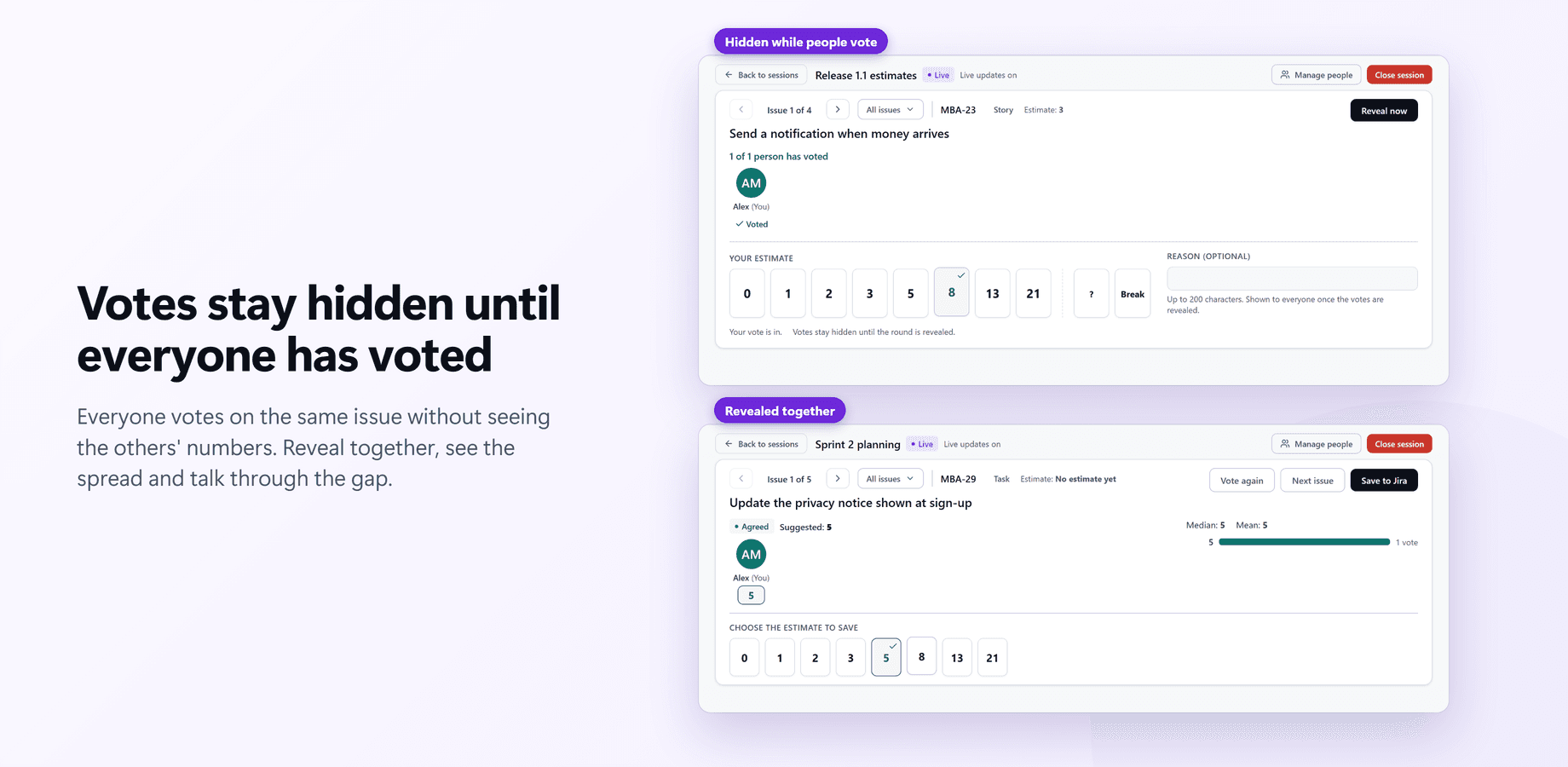
Estimates often follow the first person who speaks. Team Estimates keeps every vote hidden until everyone has voted, then reveals them together, so you can talk through the gap. Vote live in a session or in your own time before a deadline, see the median and the spread, and save the agreed estimate straight to the issue in Jira as the person who saved it. Quick estimates work on any issue from its panel, with no session needed. Pick issues from a sprint, the backlog or a search, and choose a card deck: Fibonacci, modified Fibonacci, T-shirt sizes, powers of two or your own. It works on company-managed and team-managed projects, Scrum and Kanban. Everything runs and stays inside Atlassian. It is free for up to 10 users, with a 30-day free trial on the Atlassian Marketplace for larger teams.
Inside the app
- Votes stay hidden until everyone has voted or the facilitator reveals the round
- Vote live together or in your own time before a deadline, with one reminder email from Jira
- See the median, the spread and who voted highest and lowest, then vote again if needed
- Save the agreed estimate to the issue's estimate field, as the person who saved it
- Quick estimate on any issue from its panel, no session needed
- Fibonacci, modified Fibonacci, T-shirt sizes, powers of two or a custom deck per project
- Free for up to 10 users. 30-day free trial for larger teams
In action
See it on screen
Get started
Up and running in a few minutes
Step 1
Install and start the trial
Select Try it free on the Atlassian Marketplace listing, pick your Jira site and start the free trial.
Step 2
Open Team Estimates
In your project, choose Team Estimates in the project navigation. If you do not see it, add it once with the plus button, then Apps, then Team Estimates.
Step 3
Start a session
Pick the issues from a sprint, the backlog or a search, choose live or async voting and invite people.
Step 4
Vote and reveal
Everyone votes without seeing the others' numbers. Reveal together, talk through the gap and vote again if needed.
Step 5
Save to Jira
Save the agreed number to the issue's estimate field. Project admins choose the card deck and the estimate field in the project settings.
How it compares
Team Estimates and the usual alternatives
| What you need | Team EstimatesComing soon | Planning Poker Agilityby Agile Pulse | Magic Estimationsby Magic Apps | Jira on its own |
|---|---|---|---|---|
| Planning poker inside Jira | YesSessions from a sprint, backlog or search | YesCards revealed simultaneously | YesPlanning Poker and Async Poker modes | NoNo built-in estimation game |
| Votes hidden until everyone has voted | YesOr until the facilitator reveals | YesShown after everyone has voted | PartlyUnbiased, consensus-based poker | NoNo hidden voting |
| Vote in your own time before a deadline | YesAsync sessions with one reminder | Not in its listingNot in its listing | YesAsync Poker mode | NoNo async voting |
| Median, spread and outliers after reveal | YesWho voted highest and lowest | PartlyDiscuss the real-time votes | Not in its listingNot in its listing | NoNo vote statistics |
| Save the agreed estimate to the issue | YesSaved as the person who saved it | YesModerators save and move on | YesStory points, time or text fields | PartlyType the value in the field |
| Quick estimate on one issue, no session | YesFrom the issue panel | Not in its listingNot in its listing | PartlyEstimate on your own | PartlyType a value, no vote |
| Runs on Atlassian | Built on Forge; the label comes with the listing | No | No | Not applicable |
| Pricing | Free up to 10 users, then paid · free trial | Free | Free up to 10 users, then paid | Included in your Jira plan |
Planning poker inside Jira
- Team Estimates
- YesSessions from a sprint, backlog or search
- Planning Poker Agility
- YesCards revealed simultaneously
- Magic Estimations
- YesPlanning Poker and Async Poker modes
- Jira on its own
- NoNo built-in estimation game
Votes hidden until everyone has voted
- Team Estimates
- YesOr until the facilitator reveals
- Planning Poker Agility
- YesShown after everyone has voted
- Magic Estimations
- PartlyUnbiased, consensus-based poker
- Jira on its own
- NoNo hidden voting
Vote in your own time before a deadline
- Team Estimates
- YesAsync sessions with one reminder
- Planning Poker Agility
- Not in its listingNot in its listing
- Magic Estimations
- YesAsync Poker mode
- Jira on its own
- NoNo async voting
Median, spread and outliers after reveal
- Team Estimates
- YesWho voted highest and lowest
- Planning Poker Agility
- PartlyDiscuss the real-time votes
- Magic Estimations
- Not in its listingNot in its listing
- Jira on its own
- NoNo vote statistics
Save the agreed estimate to the issue
- Team Estimates
- YesSaved as the person who saved it
- Planning Poker Agility
- YesModerators save and move on
- Magic Estimations
- YesStory points, time or text fields
- Jira on its own
- PartlyType the value in the field
Quick estimate on one issue, no session
- Team Estimates
- YesFrom the issue panel
- Planning Poker Agility
- Not in its listingNot in its listing
- Magic Estimations
- PartlyEstimate on your own
- Jira on its own
- PartlyType a value, no vote
Runs on Atlassian
Team Estimates: Built on Forge; the label comes with the listing
Planning Poker Agility: No
Magic Estimations: No
Pricing
Team Estimates: Free up to 10 users, then paid · free trial
Planning Poker Agility: Free
Magic Estimations: Free up to 10 users, then paid
Other apps’ details come only from their public Atlassian Marketplace listings, checked on 21 November 2026. “Not in its listing” means the listing doesn’t mention it, not that the app can’t do it. Names belong to their owners. Spotted something out of date? Tell us and we’ll fix it.
Like Team Estimates for Jira, but need it to fit your company?
We can build a private version just for you, changed to match how your teams work and installed only on your Atlassian site.
Ask about a custom build- Your fields, workflows and rules
- Your wording, defaults and reports
- A private build, only on your site
- Supported by the people who built the app
Updates
What's new
- v1.1.4Latest
Small consistency improvements. Buttons now use the same look and keyboard focus as our other apps.
- v1.1.3
The project page now has the same app menu as your other EvolRed apps: the Team Estimates name and logo at the top, then Sessions and History. Loading and saving messages read more consistently, and the button next to the filter fields now lines up with them.
- v1.1.1
First release. Estimate stories as a team with hidden votes, one reveal and the agreed estimate saved to Jira, in live or async sessions or as a quick estimate on any issue. Automatic finds your project's estimate field, and on a project with no estimate field it asks you to choose one instead of picking an unrelated number field.
Need a custom plugin for your team?
We build private Atlassian plugins tailored to your workflows.