SLA Countdown for Jira
Know exactly how much time is left before an SLA breach
Not on the Atlassian Marketplace yet. Leave your email and we'll send one message when it is.
Version 2.2.0·Updated Nov 21, 2026
Overview
What it does
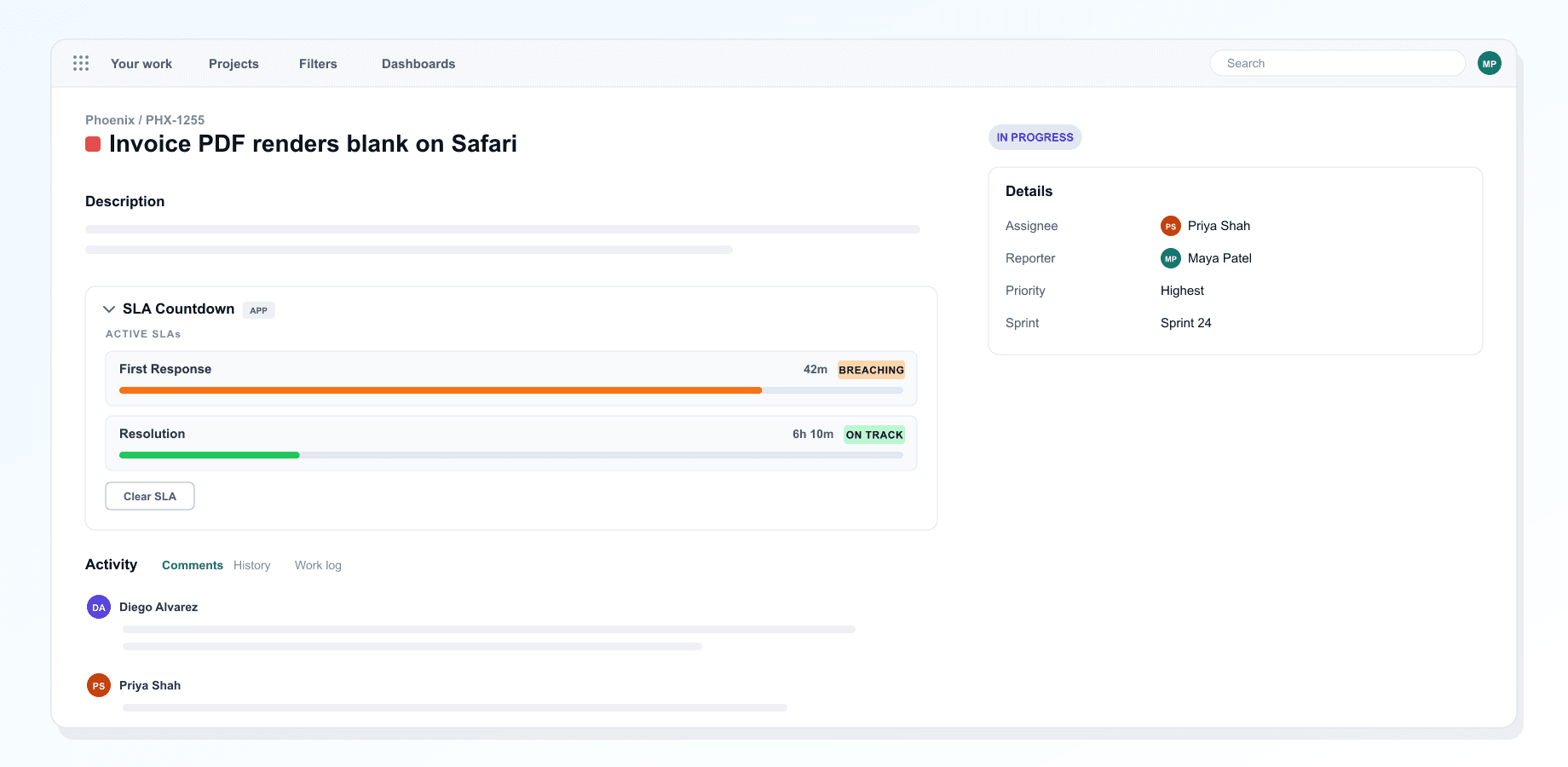
SLA breaches are expensive. They hurt customer relationships and support metrics, and sometimes they break a contract. SLA Countdown adds a real-time urgency panel to every issue showing exactly how much time remains on the response and resolution clocks, colour-coded from green to red as the deadline approaches. Set SLA targets by hand on any issue, or let a policy engine apply the right SLA automatically based on issue type and priority, with breach alerts that post warning and breach comments at configurable intervals so nothing slips through unnoticed. It is a paid app with a free trial on the Atlassian Marketplace.
Inside the app
- Real-time countdown with urgency colour coding from green through amber to red as deadlines approach
- Separate response and resolution clocks with independent urgency states
- Set an SLA by hand on any issue, with nothing to configure
- Policy engine that auto-applies SLA rules based on issue type and priority
- Breach warnings posted as comments when a target is close or missed
- Business-hours clocks that pause outside working time, set from the admin settings page
In action
See it on screen
Get started
Up and running in a few minutes
Step 1
Install and start the trial
Select Try it free on the Atlassian Marketplace listing, pick your Jira site and start the free trial.
Step 2
Set a target
On an issue, open SLA Countdown and enter response and resolution targets in hours.
Step 3
Create policies
In Jira Settings, Apps, SLA Countdown Settings, add policies by issue type and priority.
Step 4
Add business hours and warnings
Pause clocks outside working hours and post a comment before a breach.
Why this app
Why teams pick SLA Countdown
- An SLA on one issue, by handType the hours on the issue. Nothing to configure first.
- No Service Management neededIt works on any Jira Cloud site.
- Response and resolution, on separate clocksEach turns from green to amber to red as time runs out.
- A warning before the breachA comment on the issue, so the people on it see it.
Like SLA Countdown for Jira, but need it to fit your company?
We can build a private version just for you, changed to match how your teams work and installed only on your Atlassian site.
Ask about a custom build- Your fields, workflows and rules
- Your wording, defaults and reports
- A private build, only on your site
- Supported by the people who built the app
Updates
What's new
- v2.2.0Latest
Policies now pick the issue type and priority from lists of the ones your Jira site has, and keep working if you rename them. A policy that names an issue type or priority Jira does not have is marked in the editor. The panel and admin page show the SLA Countdown icon.
- v2.1.1
Breach warnings are now actually posted, and each SLA gets one warning at 75% of target and one on breach instead of repeated comments. An optional "Remind again while breached" setting is off by default. Business-hours clocks are exact and handle daylight saving. Now a paid app with a free trial on the Atlassian Marketplace.
- v1.2.3
Paying customers no longer see suggestions for other EvolRed apps. On the free plan there is just one line in the footer.
Show all 5 updates
- v1.2.0
SLA Countdown Panel is now freemium. Free: set SLA targets per issue and watch the live countdown. Paid: SLA policies applied automatically by issue type and priority, business-hours clocks and scheduled breach-warning comments.
- v1.0.0
Initial release with real-time SLA countdown panel, urgency colour coding, manual SLA setting, paid policy engine with auto-matching, breach alert system with scheduled comments, and admin settings page
Need a custom plugin for your team?
We build private Atlassian plugins tailored to your workflows.