Pre-flight Checklist for Jira
Make sure every issue is ready before it moves forward
Not on the Atlassian Marketplace yet. Leave your email and we'll send one message when it is.
Version 3.0.9·Updated Oct 16, 2026
Overview
What it does
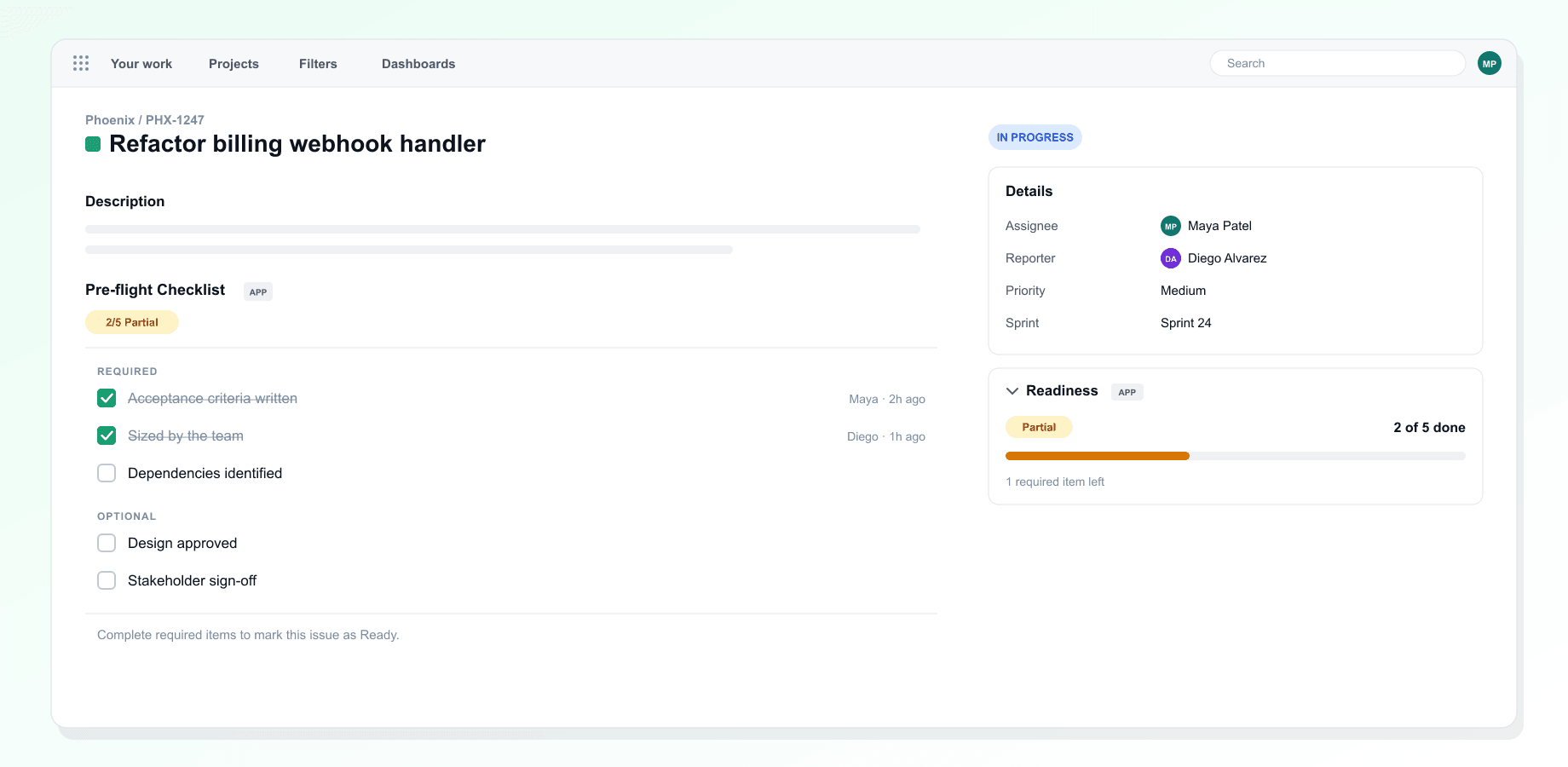
Work starts too early. A story gets picked up without acceptance criteria, or a bug goes to a developer before anyone could reproduce it. Pre-flight Checklist lets you agree what "ready" means for each issue type, as a short checklist with required and optional items. Every issue shows a readiness card in the sidebar ("2 of 5 done" plus what is left), and the team ticks items off right on the issue, with each tick showing who made it and when. The readiness report shows how much of your backlog or sprint is genuinely ready, with filters and CSV export. It is a paid app with a free trial on the Atlassian Marketplace, and everything is included: no limits on templates, tracked issues or the report.
Inside the app
- A checklist template per issue type, with required and optional items
- Readiness card on every issue: status, progress and what is left
- Tick items off on the issue, with who ticked each one and when
- Readiness report for the backlog or a sprint, with filters and CSV export
- Five starter templates, including Scrum Definition of Ready, Bug Triage Gate and QA Gate
- Paid app with a free trial. No limits on templates or tracked issues
In action
See it on screen
Get started
Up and running in a few minutes
Step 1
Install and start the trial
Select Try it free on the Atlassian Marketplace listing, pick your Jira site and start the free trial.
Step 2
Create a template
In Project settings, open Pre-flight Templates and define "ready" for an issue type.
Step 3
Tick it off on issues
On an issue, choose Pre-flight Checklist under View app actions; the Readiness card shows progress.
Step 4
Review before planning
The Readiness Report tab shows what is ready in a sprint or JQL query.
Updates
What's new
- v3.0.9Latest
A checklist, who ticked it and the template are only shown to people who can see the issue in Jira. Only project admins can change templates, and ticking an item needs permission to edit the issue. Ticking is quicker, template errors stay next to the Save button until you fix them, and the app icon appears next to every Pre-flight surface. In projects without a sprint board (Kanban, business and service projects) the readiness report opens in Custom JQL, and the Sprint view no longer lists Kanban boards. The report no longer writes your search to the app logs.
- v3.0.0
Pre-flight Checklist is now a paid app with a free trial on the Atlassian Marketplace. During the trial and while subscribed, everything is included, with no limits on templates, tracked issues or the report. Without an active trial or subscription, the app explains that a Jira admin can subscribe from Manage apps. Data about closed Atlassian accounts is now removed automatically. Every week the app checks the account IDs it stores with Atlassian and erases them for closed accounts.
- v2.13.2
Paying customers no longer see suggestions for other EvolRed apps. On the free plan there is just one line in the footer. Deleting a person's data on request now also removes their record of having seen the app-suggestion card.
Show all 12 updates
- v2.13.0
The Readiness section in the issue sidebar is now a summary card with the status, a "2 of 5 done" count, a progress bar and what is left. Each ticked item shows who ticked it and when; names are looked up from Jira and never stored, which needs one extra permission. The readiness report no longer counts issues without a checklist, such as epics, as not ready.
- v2.11.10
The readiness report now includes every matching issue, up to 1,000, instead of stopping at the first 100. Choosing an issue type with no template no longer blanks the settings page, the readiness badge updates as soon as you tick an item, CSV exports handle commas and accents correctly, and the free plan explains when its 10-issue limit undoes a tick.
- v2.11.0
Paid licences now unlock the paid plan. Before, a missing setting kept every install on the free plan (1 template, 10 issues), even for paying customers. External links in the app now open correctly.
- v2.10.1
Fixed external links (logo, footer) silently failing inside Atlassian's sandboxed iframe. They now open as expected.
- v2.9.0
Checklist panel gains a progress bar and an X of Y complete count. Context badge gets a richer display with status pill, progress bar, and guidance text. Readiness report adds an explicit Search button, falls back to JQL mode when no boards or sprints exist, and switches to POST search to fix encoding issues. Fixed a missing total in the report resolver and a duplicate project filter when JQL already contained one.
- v2.8.0
Added readiness report page with sprint and JQL filtering, CSV export, and sortable columns. Improved checklist toggle with optimistic UI for instant feedback
- v2.0.0
Major release. Added readiness badge on issue context, visual template editor in project settings, licence tier gating, and five built-in checklist presets
- v1.5.0
Added project settings page with template management, improved checklist rendering performance, added support for custom checklist items alongside presets
- v1.0.0
Initial release with issue panel checklist, toggle support, basic template configuration, and readiness calculation engine with full test coverage
Need a custom plugin for your team?
We build private Atlassian plugins tailored to your workflows.