
Issue Template Library for Jira
Create perfect issues every time with reusable templates
Not on the Atlassian Marketplace yet. Leave your email and we'll send one message when it is.
Version 2.3.3·Updated Nov 22, 2026
Overview
What it does
Every team has that one person who writes great bug reports. Clear steps to reproduce, expected vs actual behaviour, environment details. Everyone else writes 'it's broken'. Issue Template Library captures what a good issue looks like and makes it repeatable. Define templates per issue type with pre-filled descriptions, priority, labels, and components, then apply them in one click from the issue panel or create new issues straight from the template library. Need something smarter? The built-in Rovo AI agent can merge an existing issue's content into a template structure without losing any information. Start with six built-in presets or build your own. It is free, with no limit on templates.
Inside the app
- Reusable templates per issue type with Markdown descriptions that convert to Jira's rich text automatically
- One-click apply from the issue panel that overwrites or merges into existing content with confirmation
- Quick-create page to spin up new issues directly from your template library
- Rovo-powered Smart Apply that intelligently merges existing issue content into template structure
- Six built-in presets (Bug Report, Feature Story, Hotfix, Epic Goal, Support Escalation, Tech Debt) to get started instantly
- Free. Unlimited templates, field defaults and create from template
In action
See it on screen
Get started
Up and running in a few minutes
Step 1
Install the app
Select Get it now on the Atlassian Marketplace listing, pick your Jira site and confirm. It is free.
Step 2
Create your templates
In Project settings, open Issue Template Library and build one per issue type, or start from a preset.
Step 3
Apply one in a click
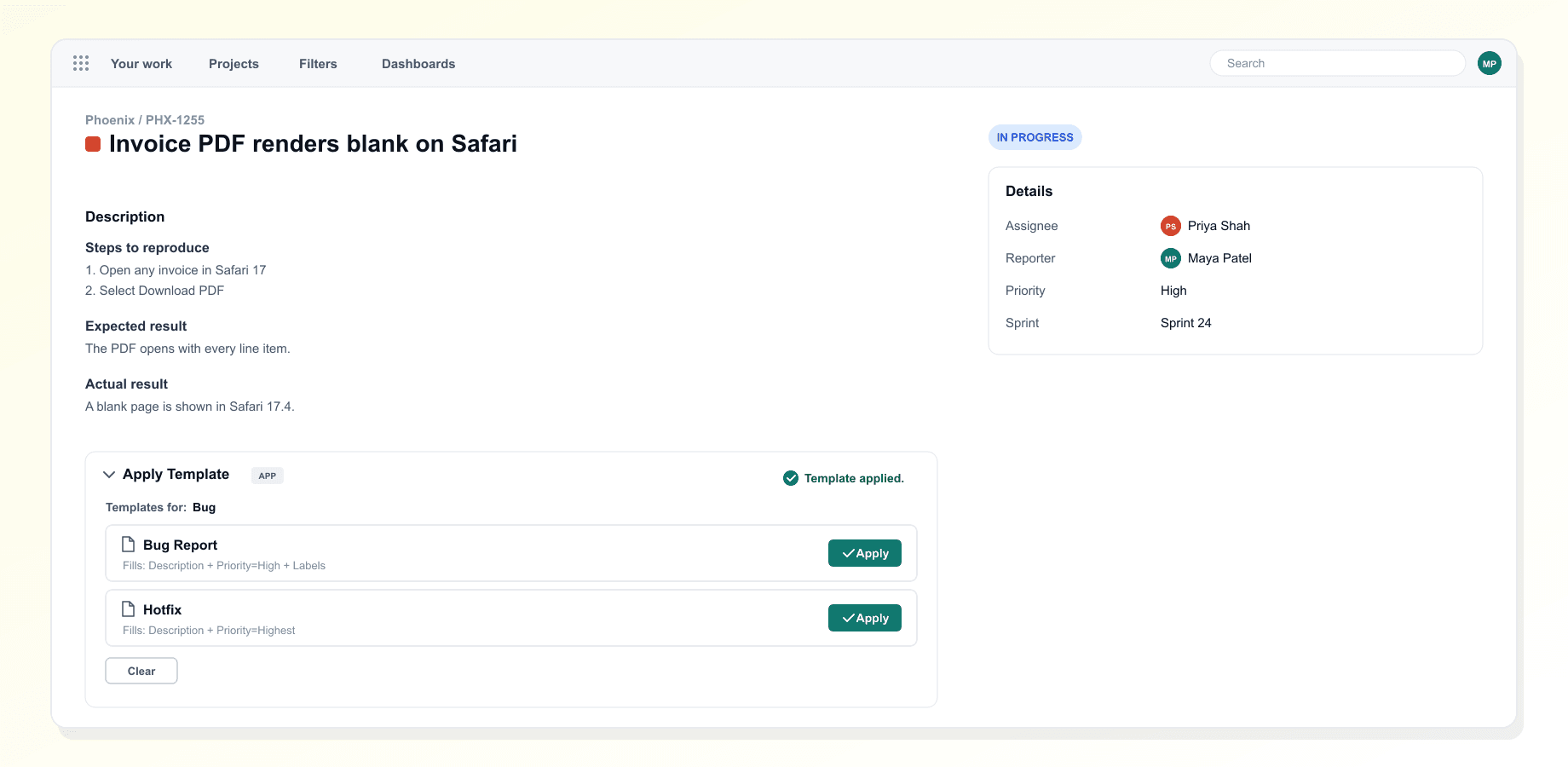
On any issue, select Apply Template and pick a template.
Step 4
Create from a template
Use the Create from Template tab to start new issues already structured.
Like Issue Template Library for Jira, but need it to fit your company?
We can build a private version just for you, changed to match how your teams work and installed only on your Atlassian site.
Ask about a custom build- Your fields, workflows and rules
- Your wording, defaults and reports
- A private build, only on your site
- Supported by the people who built the app
Updates
What's new
- v2.3.3Latest
New app logo.
- v2.3.2
Page names now follow the app name: "Issue Template Library" for the page and "Issue Template Library settings" for project settings.
- v2.3.1
Renamed to Issue Template Library for Jira. Your templates and settings are unchanged.
Show all 11 updates
- v2.3.0
The six ready-made templates now work on sites that rename their issue types: the template picks your project's issue type at the same level, and you can still change it before saving. Loading, empty and error messages now match the other EvolRed apps.
- v2.0.4
The Apply Template panel and the preset library open faster. A failed template save now shows an error you can act on, and only project admins can create or edit templates. Now a paid app with a free trial on the Atlassian Marketplace.
- v1.2.3
Paying customers no longer see suggestions for other EvolRed apps. On the free plan there is just one line in the footer.
- v1.2.0
Issue Template is now freemium. Free: up to 3 templates per project. Paid: unlimited templates, field defaults and quick-create from a template.
- v1.1.1
Fixed external links (logo, footer) silently failing inside Atlassian's sandboxed iframe. They now open as expected.
- v1.0.0
Initial release with template CRUD, project settings page, issue panel apply flow, quick-create project page, Rovo Smart Apply agent with fallback, six built-in presets, and freemium licence gating
- v0.9.0
Beta release. Polished panel design for Forge iframes, fixed ADF conversion bug for nested lists and code blocks, made Smart Apply always visible
- v0.1.0
Initial scaffold with Markdown-to-ADF conversion engine, template storage layer, resolver registry, and esbuild pipeline with three UI bundles
Need a custom plugin for your team?
We build private Atlassian plugins tailored to your workflows.