
Field Nudge for Jira
Gentle reminders to fill in the fields that matter
Get it on the MarketplaceVersion 1.7.2·Updated Nov 22, 2026
Overview
What it does
Missing story points. No description. Unassigned for three days. Every team has the same problem: issues move through the board with key fields left empty, and nobody notices until it causes a problem downstream. Field Nudge runs an hourly background scan and sends targeted notifications to issue assignees when required fields are incomplete. Admins configure which fields matter per project (story points, description, assignee, due date) and set cooldown periods to avoid notification fatigue. A completeness indicator on the issue panel shows field status at a glance. It's a free, lightweight nudge that keeps your Jira data clean without adding process overhead.
Inside the app
- Hourly automated scans that check open issues for missing required fields
- Configurable field rules per project covering story points, description, assignee, and due date
- Smart cooldown tracking to prevent notification spam with configurable hours between nudges
- Issue panel indicator showing field completeness status at a glance
- Project settings page with rule toggles and cooldown configuration
- Completely free with no licence gating, no upgrade prompts, and no feature restrictions
In action
See it on screen
Get started
Up and running in a few minutes
Step 1
Install from the Marketplace
Select Get it now on the Atlassian Marketplace listing, pick your Jira site and confirm.
Step 2
Turn it on per project
In Project settings, open Field Reminder Settings and switch reminders on.
Step 3
Choose the rules
Pick the fields that matter and the cooldown between reminders.
Step 4
Let it run
An hourly check reminds the right person when a field is still empty.
Like Field Nudge for Jira, but need it to fit your company?
We can build a private version just for you, changed to match how your teams work and installed only on your Atlassian site.
Ask about a custom build- Your fields, workflows and rules
- Your wording, defaults and reports
- A private build, only on your site
- Supported by the people who built the app
Updates
What's new
- v1.7.2Latest
Small wording consistency: Try again, Save and Saving… now read the same as in our other apps. Nothing works differently.
- v1.7.1
The settings save error now reads the same as in our other apps.
- v1.7.0
Choose the story point field for each project. If your site has more than one, reminders now check the one your project uses, and Automatic picks it from your board and project type.
Show all 16 updates
- v1.6.6
You can set how long each rule waits after an issue is created (half an hour to 168 hours). Settings are one form with one Save button, and the Required Fields panel lists each field as complete or missing even when reminders are off. Projects without a story point field no longer get Story Points reminders, and story point answers can no longer be changed by someone with few permissions. Plain messages replace technical errors.
- v1.6.5
The Required Fields panel and project settings page now show the Field Nudge icon.
- v1.6.4
Security fix: whether a project has a story point field is now always worked out by the app, so opening the settings page can no longer change the Story Points rule for everyone.
- v1.6.3
The Story Points rule is greyed out, with the reason, in every project that has no story point field, and reminders never ask for story points there.
- v1.6.2
You can now set how long each field rule waits after an issue is created. The settings page is one form with one Save button and clearer wording.
- v1.6.1
The Required Fields panel lists each field as complete or missing even when reminders are switched off, and shows an error with Retry if an issue cannot load.
- v1.6.0
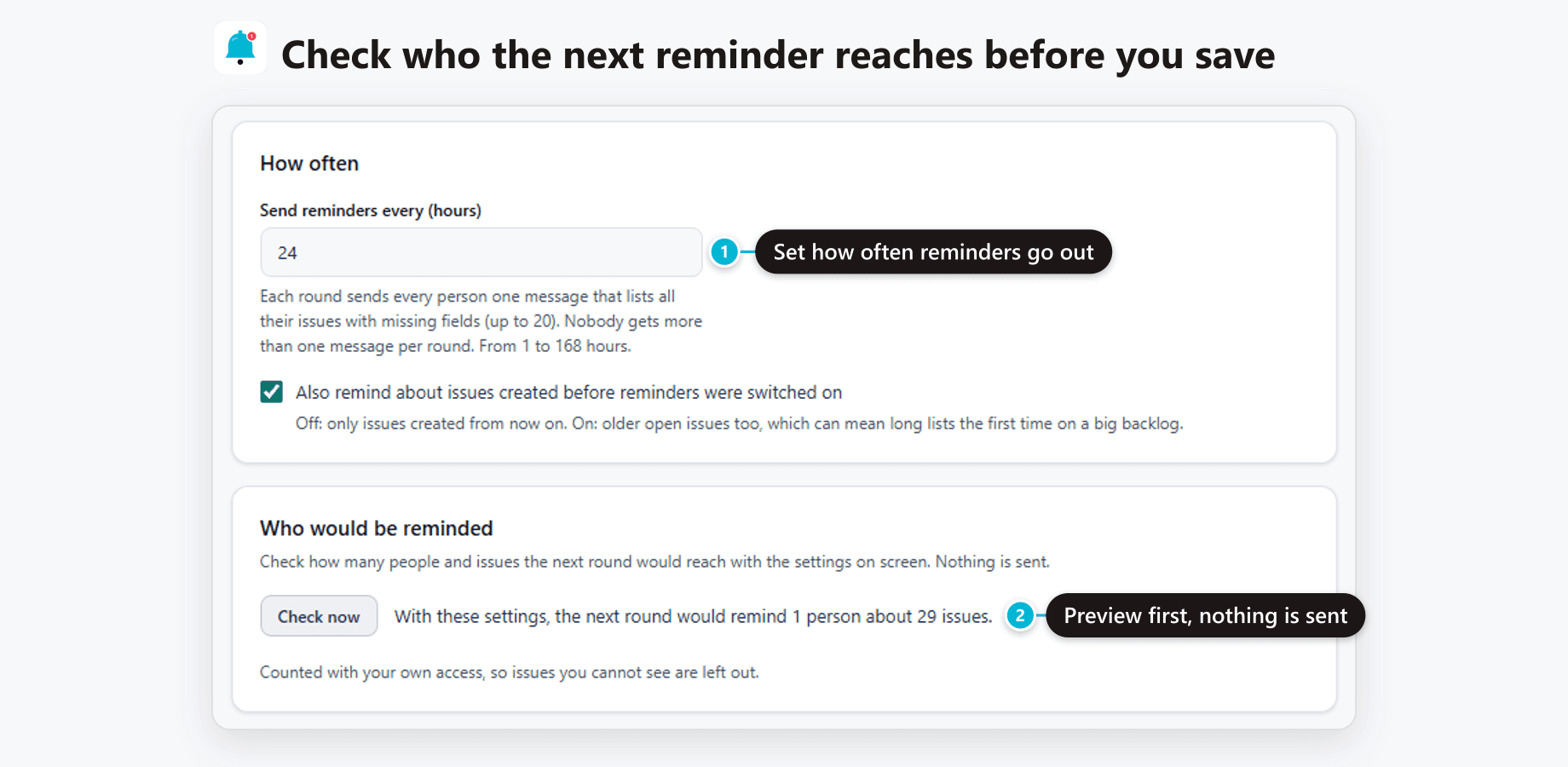
Each person now gets one reminder per round listing all their issues with missing fields, instead of one email per issue. Reminders cover only issues created after reminders were switched on, with an option to include older ones, and the settings page shows who would be reminded before you save. Reminders are now actually sent, story points are read from your site's own fields, and each rule can check the issue types you choose.
- v1.3.0
Reminders are now actually sent. The hourly check was set up in a way Forge never ran, so no reminders went out before. The "Also send email notifications" setting is gone: whether a reminder also arrives by email follows each person's own Jira notification preferences.
- v1.2.1
The panel footer now links to more Jira tools by EvolRed.
- v1.1.1
Fixed external links (logo, footer) silently failing inside Atlassian's sandboxed iframe. They now open as expected.
- v1.0.0
Initial release with hourly scheduled field checks, four default field rules, per-project settings with rule toggles and cooldown configuration, issue panel completeness indicator, and GDPR privacy handlers
- v0.9.0
Beta release. Addressed code review findings, added project settings page and issue panel indicator UIs, integrated shared design system
- v0.1.0
Initial scaffold with rule engine and unit tests, Jira API fetcher for issues and notifications, scheduled trigger, and storage layer for cooldown tracking
Need a custom plugin for your team?
We build private Atlassian plugins tailored to your workflows.