Changelog Panel for Jira
The full history of every issue change, right on the panel
Get it on the MarketplaceVersion 1.3.3·Updated Nov 22, 2026
Overview
What it does
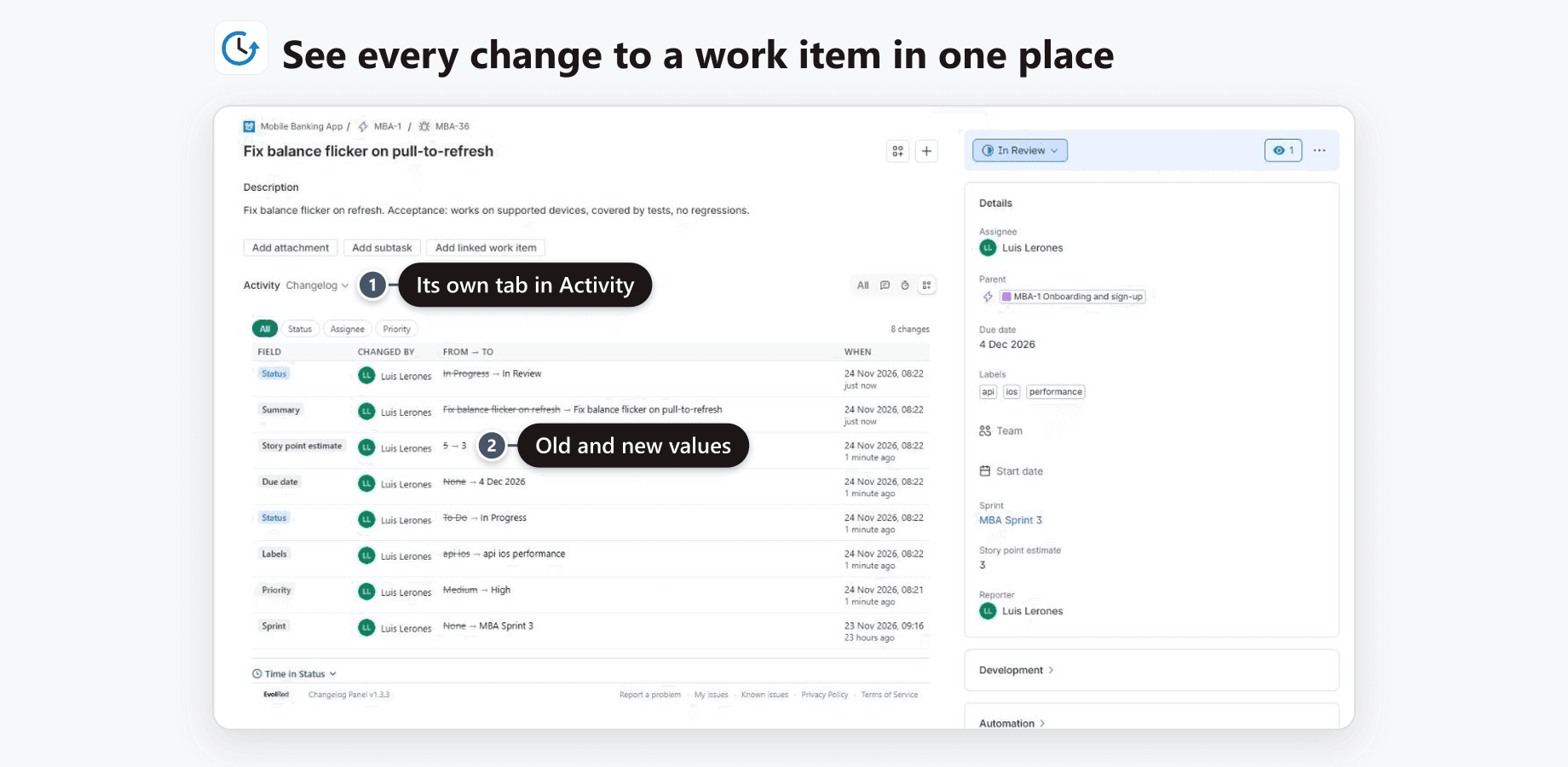
Jira's built-in history is there, but it is not exactly easy to read. Changelog Panel replaces the noise with a clean, paginated view of every field change on the issue: who changed what, from which value to which value, and when. Scroll back through the entire life of the ticket without leaving the issue view. The time-in-status summary at the top tells you exactly how long the issue spent in each status, so you can spot where work is getting stuck across your team without running a separate report.
Inside the app
- Paginated changelog view showing every field change with author, timestamp, and before/after values
- Time-in-status summary showing exactly how long the issue spent in each workflow status
- Author avatars and display names on every changelog entry
- 50 entries per page with navigation for long issue histories
- Filter the history by field: status, assignee, priority or anything else
- Read-only, and works on every issue without any setup
In action
See it on screen
Get started
Up and running in a few minutes
Step 1
Install from the Marketplace
Select Get it now on the Atlassian Marketplace listing, pick your Jira site and confirm. There is nothing to configure.
Step 2
Open the Changelog panel
On any issue, select the Changelog button under the summary.
Step 3
Filter the history
Show every change, or only status, assignee or priority changes.
Step 4
Check time in status
See how long the issue spent in each status and its total cycle time.
Like Changelog Panel for Jira, but need it to fit your company?
We can build a private version just for you, changed to match how your teams work and installed only on your Atlassian site.
Ask about a custom build- Your fields, workflows and rules
- Your wording, defaults and reports
- A private build, only on your site
- Supported by the people who built the app
Updates
What's new
- v1.3.3Latest
New app logo.
- v1.3.2
Changelog is now a tab in the Activity section of every work item, beside Comments and History, with no need to add the panel first. The history loads by itself, newest changes first, with Load older changes on a long history. The When column shows the date and time of each change, and long values show their first three lines with Show more. A sprint added to a work item for the first time now reads "None" before the arrow instead of an empty value.
- v1.2.3
Every change now shows in the panel (it used to say "Showing 0 of N updates"), and Time in Status counts status changes again. Buttons and filters are styled, and errors come with a Try again button.
Show all 5 updates
- v1.1.1
The panel footer now links to more Jira tools by EvolRed.
- v1.0.0
Initial release with paginated field-change history, author and timestamp display, time-in-status summary, and cycle time metrics
Need a custom plugin for your team?
We build private Atlassian plugins tailored to your workflows.