
Blocker Status for Jira
See exactly what is blocking your issues before your standup
Get it on the MarketplaceVersion 1.6.1·Updated Nov 22, 2026
Overview
What it does
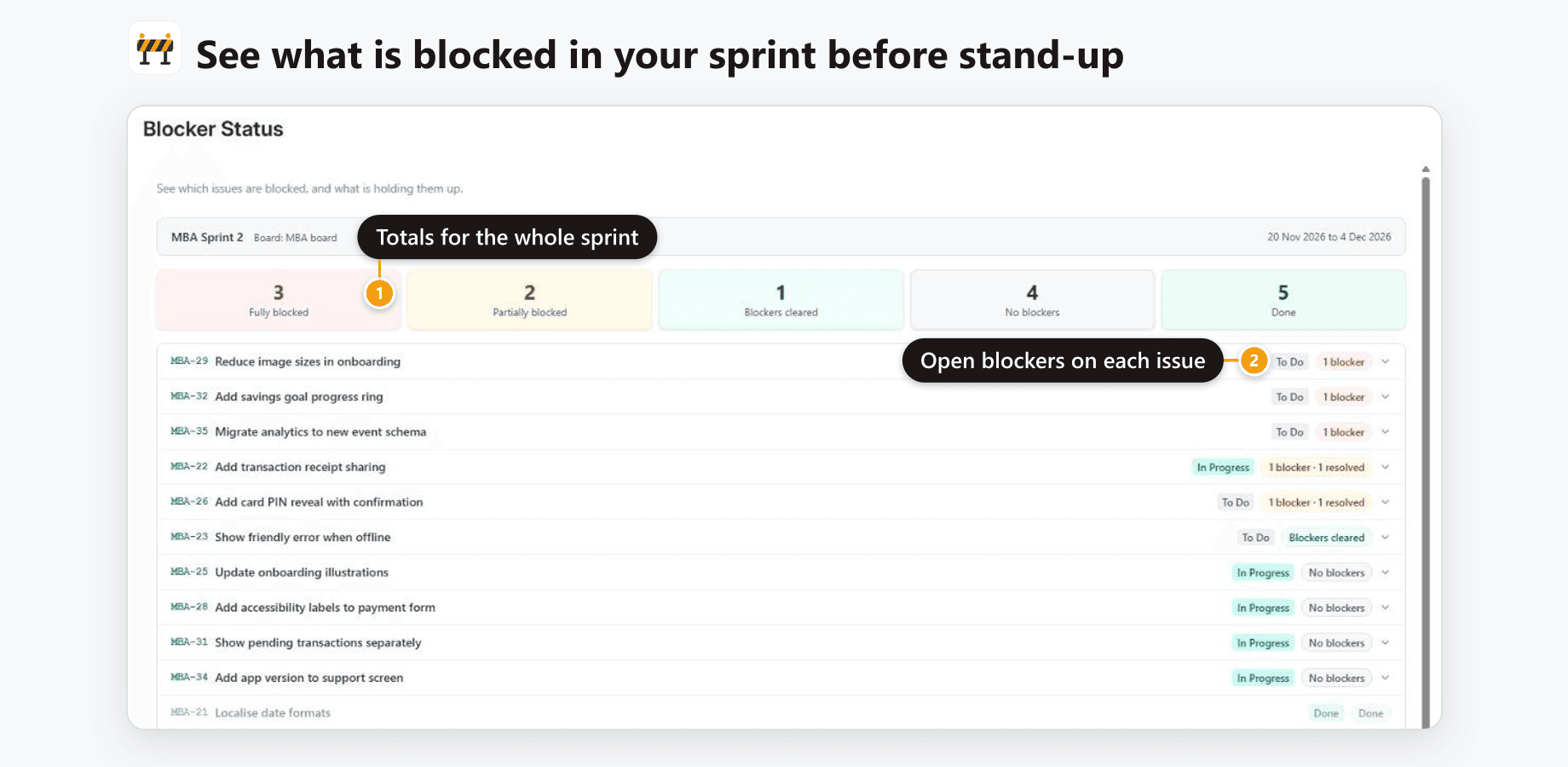
Blocked issues slow a sprint down, and they often stay invisible until someone asks about them in standup. Blocker Status adds a project page that lists every issue in the active sprint and shows which ones are blocked. For each issue it reads the "is blocked by" and "blocks" links, so you see what is holding it up and what is waiting on it. Blockers that are already done are marked resolved, and issues whose blockers have all cleared are labelled as ready to start. Counts at the top tell you how many issues are fully blocked, partially blocked, unblocked or done. It is free.
Inside the app
- Project page that lists every issue in the active sprint and flags the blocked ones
- Expand any issue to see what is blocking it and which issues it blocks
- Resolved blockers are marked as such, so you can tell a real blocker from a cleared one
- "Blockers cleared" label on issues that are ready to start
- Sprint summary with fully blocked, partially blocked, unblocked and done counts
- Free and read-only. Works with no setup
In action
See it on screen
Get started
Up and running in a few minutes
Step 1
Install from the Marketplace
Select Get it now on the Atlassian Marketplace listing, pick your Jira site and confirm. There is nothing to configure.
Step 2
Open the Blocker Status tab
In your project, open the new Blocker Status tab. If your project has a lot of tabs, it is under More. Projects without sprints list every open issue.
Step 3
Read the counts
See how many issues are fully blocked, partially blocked, have their blockers cleared, have no blockers or are done. Select a total to list just those issues.
Step 4
Expand an issue
See what is blocking it, what it blocks, and which blockers are already resolved.
Like Blocker Status for Jira, but need it to fit your company?
We can build a private version just for you, changed to match how your teams work and installed only on your Atlassian site.
Ask about a custom build- Your fields, workflows and rules
- Your wording, defaults and reports
- A private build, only on your site
- Supported by the people who built the app
Updates
What's new
- v1.6.1Latest
The page now starts with a short line explaining what it shows.
- v1.6.0
Projects without sprints (Kanban, business, service, and team-managed projects with sprints off) now show every open issue and its blockers, instead of an empty page. Boards that belong to other projects are no longer used to find your sprint.
- v1.5.5
Loading, empty and error messages are now worded more clearly and consistently. Nothing else works differently.
Show all 10 updates
- v1.5.4
A sprint picker for projects with several boards or parallel sprints, and no more false "No active sprint" messages. A new "Blockers cleared" total shows issues ready to move, and you can click a total to filter the list. Issue keys open in a new tab. The project tab is now called Blocker Status.
- v1.5.1
Sprints with many issues are always listed in full, and when Jira can't return the project's boards or active sprint the page now says something went wrong instead of "No active sprint". The overview loads with one request fewer, the app asks for one permission fewer (no access to user details), and the cards promoting other EvolRed apps are gone. The footer has Report a problem, My issues and Known issues links to the EvolRed support portal.
- v1.3.7
Blocker Status now uses the project's first board with sprints, so team-managed Scrum projects, and projects whose first board is a Kanban board, show their active sprint. Projects without a sprint board see that Blocker Status needs one. The app icon appears next to the Sprint Blocker Overview tab.
- v1.3.0
Data about closed Atlassian accounts is now removed automatically. Every week the app checks the account IDs it stores with Atlassian and erases them for closed accounts.
- v1.2.3
Expanding an issue now also lists the issues it blocks, and issues whose blockers are all resolved show "Blockers cleared" so you can spot work that is ready to start. Pressing Space on a row no longer scrolls the page, and Jira errors while loading sprint issues now show a clear message.
- v1.2.0
Added the Jira Software permissions the board and sprint views need, so the blocker overview loads reliably.
- v1.0.0
Initial release with blocker status panel, blocking and blocked-by relationship display, resolution status indicators, assignee avatars, and collapsible blocker sections
Need a custom plugin for your team?
We build private Atlassian plugins tailored to your workflows.