
Backlog Priorities for Jira
Agree what to build next, then reorder your backlog
Compared with Appfire and Appbox.ai
Not on the Atlassian Marketplace yet. Leave your email and we'll send one message when it is.
Version 1.1.8·Updated Nov 22, 2026
Overview
What it does
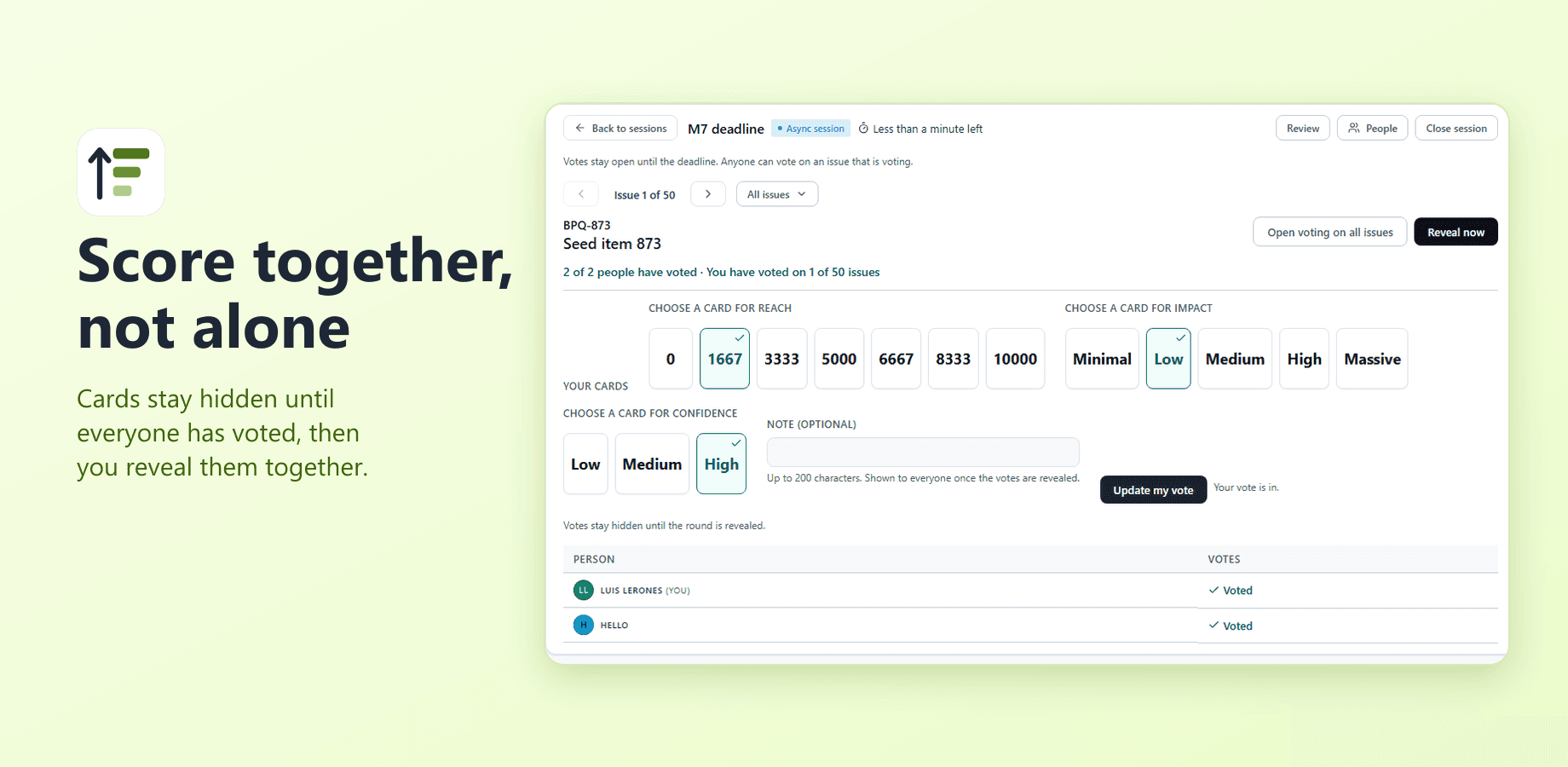
Backlog order often gets decided by the loudest voice or a spreadsheet nobody trusts. Backlog Priorities lets your team score every issue together with RICE, ICE, WSJF, MoSCoW, value versus effort or your own formula, and Jira fills in the data it already has: story points, due dates, votes, linked issues and your own number fields. Score live in a session or in your own time, with votes hidden until the reveal. Then apply the result: a Priority score field you can use in filters, sorting and columns, a new backlog order with a preview and an undo, and a sprint cut line that shows what fits. It works on your existing Jira backlog, with no separate project to set up. Everything runs and stays inside Atlassian. It is free for up to 10 users, then $0.50 per user per month, with a 30-day free trial on the Atlassian Marketplace.
Inside the app
- Score every issue with RICE, ICE, WSJF, MoSCoW, value versus effort, weighted scoring or your own formula
- Score together, live or in your own time, with votes hidden until the reveal
- Jira fills in story points, due dates, votes, watchers, linked issues and your own number fields
- A Priority score field for filters, sorting and columns, kept up to date as things change
- Reorder your backlog from the scores, with a preview first and an undo for 24 hours
- A sprint cut line from your capacity, and one click to move what fits into a sprint
- Free for up to 10 users, then $0.50 per user per month. 30-day free trial
In action
See it on screen
Get started
Up and running in a few minutes
Step 1
Install and start the trial
Select Try it free on the Atlassian Marketplace listing, pick your Jira site and start the free trial.
Step 2
Open Backlog Priorities
In your project, choose Backlog Priorities in the project navigation. If you do not see it, look under More.
Step 3
Pick how you score
Open the settings page and choose RICE, ICE, WSJF, MoSCoW, value versus effort or your own formula. Project admins can change the criteria later.
Step 4
Score your backlog
Fill in the grid yourself, let Jira supply what it already knows, or start a session so your team scores together.
Step 5
Apply the result
On the Apply tab, preview the new backlog order, confirm it, and set a sprint cut line from your capacity.
How it compares
Backlog Priorities and the usual alternatives
| What you need | Backlog PrioritiesComing soon | Foxlyby Appfire | Backlog Prioritization for Jira (Lite)by Appbox.ai | Jira on its own |
|---|---|---|---|---|
| Score with RICE, ICE, WSJF or your own formula | YesPlus MoSCoW and weighted scoring | YesRICE, ICE, WSJF and custom scores | YesWSJF, RICE, ICE or own formula | PartlyA number field, worked out by hand |
| Score together, votes hidden until reveal | YesLive or in your own time | PartlyPriority planning poker with the team | Not in its listingNot in its listing | NoNo team scoring |
| Jira fills in the data it already has | YesStory points, due dates, votes, links | Not in its listingNot in its listing | YesScore built from your Jira fields | NoNo scoring from fields |
| Score in a Jira field for filters and sorting | YesPriority score field, kept up to date | PartlyScore panel on the issue | YesSort, filter and search with JQL | NoNo priority score |
| Reorder the backlog from the scores | YesPreview first, undo for 24 hours | Not in its listingNot in its listing | Not in its listingNot in its listing | PartlyDrag to rank by hand |
| Sprint cut line from your capacity | YesMove what fits in one click | Not in its listingNot in its listing | Not in its listingNot in its listing | PartlyDrag issues into the sprint by hand |
| Runs on Atlassian | Built on Forge; the label comes with the listing | No | Yes | Not applicable |
| Pricing | Free up to 10 users, then paid · free trial | Free up to 10 users, then paid | Free up to 10 users, then paid | Included in your Jira plan |
Score with RICE, ICE, WSJF or your own formula
- Backlog Priorities
- YesPlus MoSCoW and weighted scoring
- Foxly
- YesRICE, ICE, WSJF and custom scores
- Backlog Prioritization for Jira (Lite)
- YesWSJF, RICE, ICE or own formula
- Jira on its own
- PartlyA number field, worked out by hand
Score together, votes hidden until reveal
- Backlog Priorities
- YesLive or in your own time
- Foxly
- PartlyPriority planning poker with the team
- Backlog Prioritization for Jira (Lite)
- Not in its listingNot in its listing
- Jira on its own
- NoNo team scoring
Jira fills in the data it already has
- Backlog Priorities
- YesStory points, due dates, votes, links
- Foxly
- Not in its listingNot in its listing
- Backlog Prioritization for Jira (Lite)
- YesScore built from your Jira fields
- Jira on its own
- NoNo scoring from fields
Score in a Jira field for filters and sorting
- Backlog Priorities
- YesPriority score field, kept up to date
- Foxly
- PartlyScore panel on the issue
- Backlog Prioritization for Jira (Lite)
- YesSort, filter and search with JQL
- Jira on its own
- NoNo priority score
Reorder the backlog from the scores
- Backlog Priorities
- YesPreview first, undo for 24 hours
- Foxly
- Not in its listingNot in its listing
- Backlog Prioritization for Jira (Lite)
- Not in its listingNot in its listing
- Jira on its own
- PartlyDrag to rank by hand
Sprint cut line from your capacity
- Backlog Priorities
- YesMove what fits in one click
- Foxly
- Not in its listingNot in its listing
- Backlog Prioritization for Jira (Lite)
- Not in its listingNot in its listing
- Jira on its own
- PartlyDrag issues into the sprint by hand
Runs on Atlassian
Backlog Priorities: Built on Forge; the label comes with the listing
Foxly: No
Backlog Prioritization for Jira (Lite): Yes
Pricing
Backlog Priorities: Free up to 10 users, then paid · free trial
Foxly: Free up to 10 users, then paid
Backlog Prioritization for Jira (Lite): Free up to 10 users, then paid
Other apps’ details come only from their public Atlassian Marketplace listings, checked on 21 November 2026. “Not in its listing” means the listing doesn’t mention it, not that the app can’t do it. Names belong to their owners. Spotted something out of date? Tell us and we’ll fix it.
Like Backlog Priorities for Jira, but need it to fit your company?
We can build a private version just for you, changed to match how your teams work and installed only on your Atlassian site.
Ask about a custom build- Your fields, workflows and rules
- Your wording, defaults and reports
- A private build, only on your site
- Supported by the people who built the app
Updates
What's new
- v1.1.8Latest
Loading and progress messages now end with a proper ellipsis, and buttons and confirmation windows use the same look and keyboard focus as our other apps.
- v1.1.6
Project settings now use Jira's own sidebar menu, like the other EvolRed apps, and the app name shows once. The button next to the filter fields now lines up with them. Loading and saving messages read more cleanly.
- v1.1.1
On projects without a story point field, Automatic no longer says it uses Story point estimate. It now says no estimate field was found and asks you to choose one.
Show all 5 updates
- v1.1.0
Every Jira-fed criterion can now read from a field you choose, so it works on projects that keep their numbers elsewhere. Estimates follow your board: original time estimates count in hours, and projects with no estimate field count issues.
- v1.0.3
First release. Score your backlog together with RICE, ICE, WSJF, MoSCoW, value versus effort or your own formula, with Jira filling in story points, due dates, votes and linked issues. Team scoring sessions keep votes hidden until the reveal. A Priority score field for filters, sorting and columns, a value versus effort matrix, a backlog reorder with a preview and an undo, and a sprint cut line with a move to sprint.
Need a custom plugin for your team?
We build private Atlassian plugins tailored to your workflows.