
Workload Overview for Jira
See who is overloaded before it becomes a problem
Get it on the MarketplaceVersion 1.5.8·Updated Nov 22, 2026
Overview
What it does
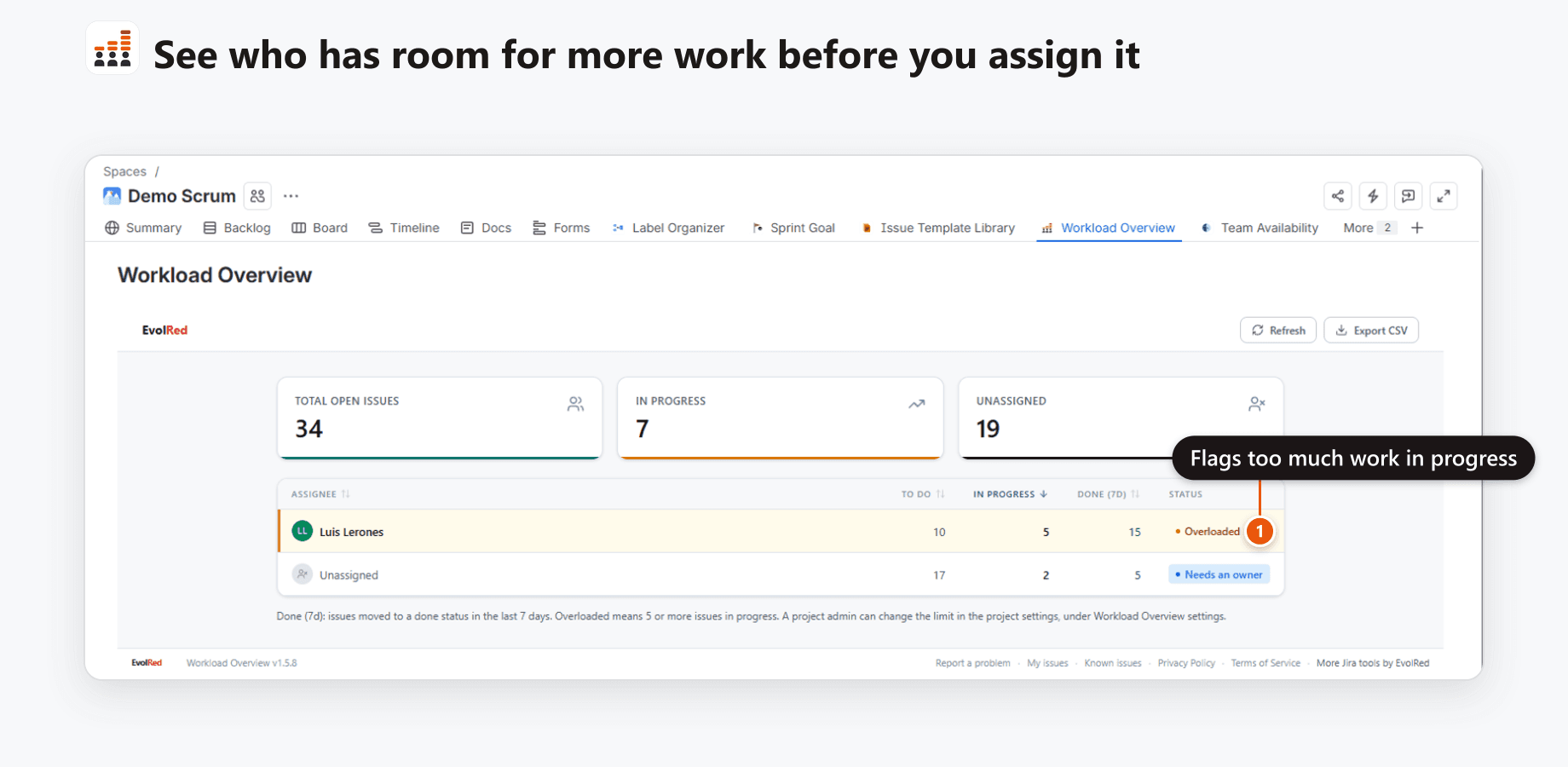
Unbalanced workloads are one of the most common and most preventable reasons sprints go sideways. Workload Overview gives project managers and team leads a per-assignee breakdown of open issues, showing the to-do, in-progress, and recently completed split for every member of the team. Configure an overload threshold and any assignee carrying more than their share gets highlighted in amber immediately. A CSV export makes it easy to share the data outside Jira, and KPI cards at the top give a fast read on total open work, in-progress items, and unassigned issues across the project.
Inside the app
- Per-assignee workload table with to-do, in-progress, and done (last 7 days) columns
- Configurable overload threshold with amber highlighting for team members carrying too much
- KPI cards showing total open issues, in-progress count, and unassigned issue count
- Sortable columns so you can rank the team by workload in any direction
- CSV export for sharing workload data in standups, retrospectives, or planning sessions
- Project settings page to configure the overload threshold per project
In action
See it on screen
Get started
Up and running in a few minutes
Step 1
Install from the Marketplace
Select Get it now on the Atlassian Marketplace listing, pick your Jira site and confirm.
Step 2
Open Workload Overview
Open the Workload Overview tab in your project.
Step 3
Read the table
See To Do, In Progress and Done (7 days) for each person, and export to CSV.
Step 4
Set the threshold
In Project settings, Workload Settings, choose when someone counts as overloaded.
Like Workload Overview for Jira, but need it to fit your company?
We can build a private version just for you, changed to match how your teams work and installed only on your Atlassian site.
Ask about a custom build- Your fields, workflows and rules
- Your wording, defaults and reports
- A private build, only on your site
- Supported by the people who built the app
Updates
What's new
- v1.5.8Latest
New app logo.
- v1.5.7
The workload loads by itself when you open the page, with Refresh and Export CSV at the top, and a note under the table explains Done (7d) and Overloaded. Done (7d) now counts issues finished in the last 7 days, so your numbers may go down. The Unassigned row reads "Needs an owner". A failed refresh keeps the last figures on screen, very large projects no longer fail with only an error, and CSV exports are safer to open in a spreadsheet. The settings page has a clearer layout and non-admins see why they cannot change the limit.
- v1.5.2
The Unassigned card shows the real number of open issues without an assignee, and the overload threshold is checked when you save. Saving settings shows "Settings saved." next to the Save button. The app no longer asks for permission to read user details.
Show all 7 updates
- v1.3.0
Data about closed Atlassian accounts is now removed automatically. Every week the app checks the account IDs it stores with Atlassian and erases them for closed accounts.
- v1.2.0
The app now links to the right companion app: the suggestion card pointed at LicenseGuard and now points to Pre-flight Checklist. The footer shows the correct version too.
- v1.1.1
Workload view now uses Jira's current search API, restoring reliable workload calculations across all project sizes.
- v1.0.0
Initial release with per-assignee workload table, overload threshold highlighting, sortable columns, KPI summary cards, CSV export, and project settings page
Need a custom plugin for your team?
We build private Atlassian plugins tailored to your workflows.