
LicenseGuard for Jira
Stop paying for Jira seats nobody is using
Get it on the MarketplaceVersion 4.5.8·Updated Nov 22, 2026
Overview
What it does
Every growing Jira instance accumulates ghost accounts: people who left, switched roles, or stopped using Jira months ago. Each quietly burns through your Atlassian licence budget. LicenseGuard finds them automatically: a scan identifies inactive accounts against thresholds you set, calculates what they cost you each year, and flags the risky ones (admins, users with open work) so you don't reclaim a seat by mistake. When you're ready, it takes you straight to Atlassian's admin console to deactivate the accounts you've reviewed, and records every safelist change and removal hand-off in an activity log. And it's completely free.
Inside the app
- Automated weekly or monthly scans that detect inactive and ghost accounts
- Cost calculator showing what you're spending on unused licences each year
- One-click hand-off to Atlassian's admin console to deactivate the accounts you've reviewed
- Activity log of safelist changes and removal hand-offs, with timestamps and the admin who made them
- Dashboard with inactive-account trends and savings over time
- Configurable thresholds and a safelist for service accounts and protected users
- Free with every feature included. No external servers, and no data leaves your Atlassian tenancy
In action
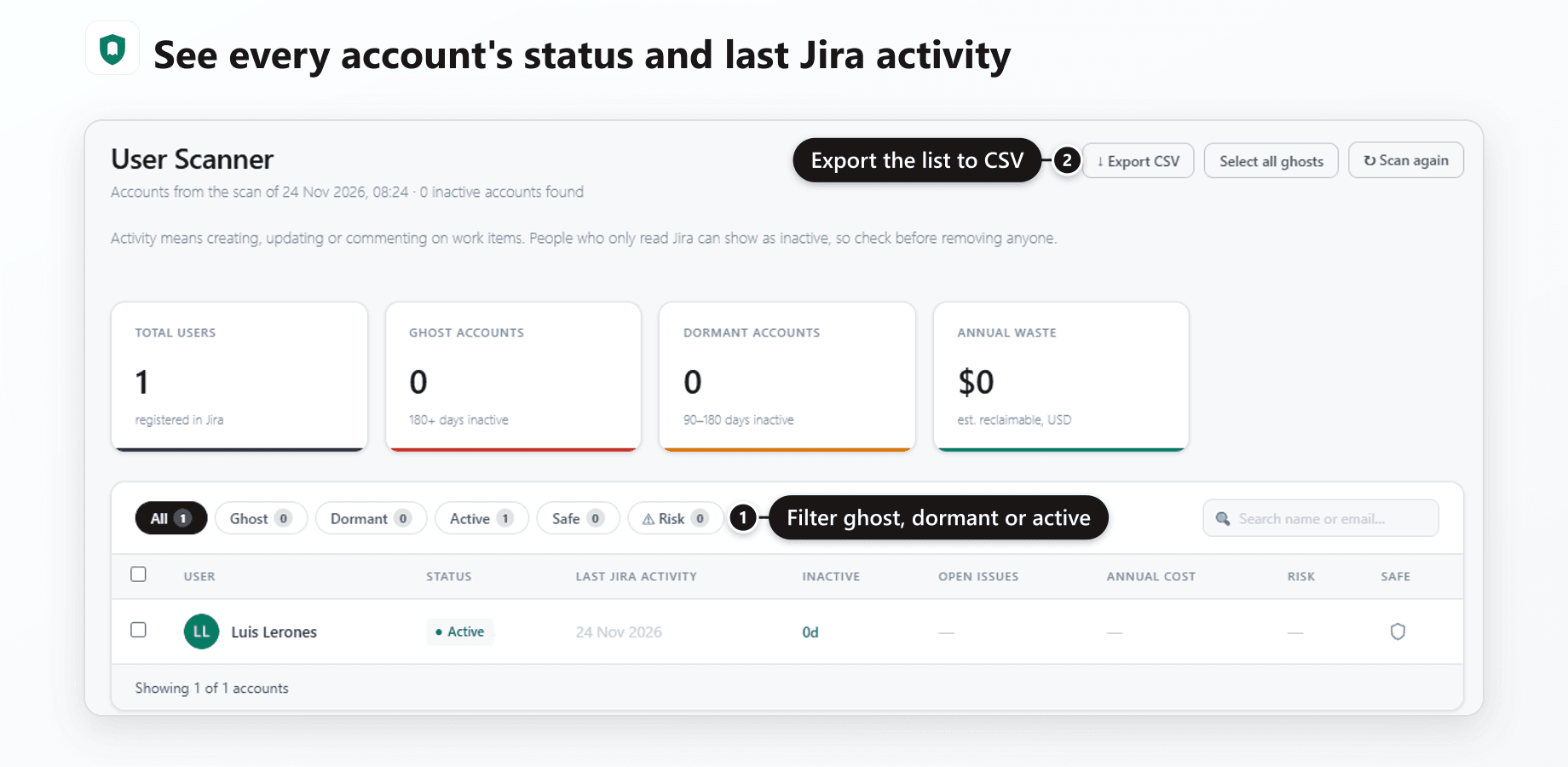
See it on screen
Get started
Up and running in a few minutes
Step 1
Install from the Marketplace
Select Get it now on the Atlassian Marketplace listing, pick your Jira site and confirm. It is free.
Step 2
Open LicenseGuard
In Jira Settings, go to Apps and select LicenseGuard. You need to be a site admin.
Step 3
Run a scan
The User Scanner classifies every account as Active, Dormant or Ghost by Jira activity.
Step 4
Review and hand off
Safelist who must stay, then deactivate the rest in Atlassian admin.
How it compares
We're not the first to think about this
Most teams reach for a manual audit or a homegrown JQL script. Here's how LicenseGuard stacks up against the alternatives we've seen most often.
| Capability | Manual audit | JQL / scripting | LicenseGuard |
|---|---|---|---|
| Effort to review a 200-user site | 2 to 4 hours | ~1 hour to write | One click |
| Flags admins and people with open work | By hand | You build it | Built in |
| ROI / cost-saving calculator | Spreadsheet | You build it | Built in |
| Log of safelist changes and removal hand-offs | No | You build it | Yes |
| Sandboxed (no external egress) | N/A | Depends | Forge-native |
| GDPR personal-data hooks | No | You build them | Yes |
| Setup time | Every audit | Days | Under 5 min |
| Cost | Admin time | Dev time and upkeep | Free |
Time estimates based on the patterns we've seen most often across mid-sized Jira instances. Your mileage will vary.
ROI calculator
How much could you save?
Adjust the sliders to estimate your annual savings from reclaiming inactive Jira seats. The math is conservative. Most teams find more inactive accounts than they expect.
Potential annual savings
$1,260
Estimate only. Actual savings depend on your seat-cleanup policy and the deactivation paths your admins choose.
Common questions
Things admins ask before installing
How does LicenseGuard decide who is inactive?
Can it deactivate someone by mistake?
What permissions does it need? Where does the data go?
Is it GDPR-compliant?
How much does it cost?
What about service accounts and bots?
Can it scan on a schedule?
Question we didn't answer? Email [email protected].
We built LicenseGuard after noticing we'd been paying for two years' worth of inactive Jira seats: accounts of contractors who'd left, founders who'd sold, ghost addresses still on the licence count. The audit was too tedious to do manually, and the JQL scripts we tried missed half the patterns. The first time we ran the proto-version on our own instance, it found 23 seats we hadn't touched in over a year.
Every Jira admin we've shown it to has the same reaction: "why isn't this just built into Jira?" It probably should be. Until then, we're shipping it as a Forge app, with the same architecture and discipline we use for the other apps in our suite.
Like LicenseGuard for Jira, but need it to fit your company?
We can build a private version just for you, changed to match how your teams work and installed only on your Atlassian site.
Ask about a custom build- Your fields, workflows and rules
- Your wording, defaults and reports
- A private build, only on your site
- Supported by the people who built the app
Updates
What's new
- v4.5.8Latest
The Reset demo data confirmation window on the Settings page opens correctly again, with a Cancel button and a red Reset demo data button. It had been blanking the page.
- v4.5.5
The five pages now use Jira's own LicenseGuard menu on the left instead of a second row of buttons, and the menu icons ship with the app, so they show even when your network blocks outside images. Loading, empty and "Try again" messages read the same as in the other EvolRed apps, and on the User Scanner the heading comes before the totals.
- v4.5.3
When the User Scanner shows totals but no list of accounts, it now says why and offers Try again. There is one scan button: Run scan before your first scan, Scan again after it. The bar for ticked accounts is one slim row under the last account you ticked, so it no longer covers the rows. Dialogs and messages open next to where you clicked, and the saved account list is deleted after 30 days. Pages now share the headings, buttons and spacing of the other EvolRed apps.
Show all 19 updates
- v4.5.2
The User Scanner now remembers the accounts from your last scan for 30 days, so the list is there when you return. Long lists show 50 accounts at a time, and Export CSV exports the accounts you ticked. Settings is one form with one Save button, the tabs fit narrow windows, and the removal hand-off now opens the Atlassian admin console. The activity log keeps recording new entries however large it grows.
- v4.4.3
Admins can now open LicenseGuard from its own item in the Apps section of Jira's main menu; only Jira admins see it. Support now goes to the EvolRed support portal: the footer offers Report a problem, My issues and Known issues, with LicenseGuard, its version and your Jira site filled in. The privacy note in Settings now matches exactly what LicenseGuard stores, and "Reset demo data" also removes demo users you marked as safe. The footer logo is easy to read in Jira's dark theme.
- v4.2.7
LicenseGuard opens faster: the admin page loads in one request instead of seven, the Audit Log looks up names 50 people at a time, and scans make fewer Jira searches. The activity log, safelist and scan results are only returned to Jira admins, and scan settings and safelist changes are checked more strictly. After reopening LicenseGuard, the User Scanner shows your last scan instead of "Ready to scan", and the app icon appears next to LicenseGuard in Jira settings → Apps.
- v4.2.0
The activity log now stores only account IDs. Names are looked up each time you open it. Data about closed Atlassian accounts is now removed automatically. Every week LicenseGuard checks the account IDs it stores with Atlassian and erases them for closed accounts.
- v4.1.6
More Tools now lists the EvolRed apps you can install today, each linking to its page. In demo mode, the Activity Log uses the same sample names as the User Scanner.
- v4.1.3
The Cost Calculator no longer overstates waste on small sites, and its sliders go down to 1 user and 0%. The Dashboard ghost count matches your last scan, and demo scans no longer leak into the real trend. "Saved since first scan" replaces the old lifetime total, which counted the same seats over and over. People on the safelist stay in the User Scanner, marked Safe, so you can take them off again.
- v4.1.0
Inactivity is now measured by Jira activity: the last time each person created, updated or commented on a work item. Jira Cloud does not share login history with apps, so the old login-based check flagged everyone on real sites. Real scans list your users again, the Open Tickets column shows real in-progress work, and LicenseGuard no longer needs access to your audit log or Jira configuration. CSV exports open cleanly in Excel and are protected against formula injection.
- v4.0.5
Fixes across the admin pages: the Cost Calculator now starts from your scan and matches the Dashboard, Settings opens with your saved values, the ghost-accounts pop-up appears once after a scan, and admins who have not granted access yet get Jira's "Allow access" prompt instead of a "forbidden" error.
- v4.0.0
LicenseGuard is now free, with every feature included. It finds the inactive "ghost" accounts quietly using up your Jira seats, shows what they cost you each year, and takes you straight to Atlassian's admin console to deactivate the ones you've reviewed. New: an activity log of safelist changes and removal hand-offs, optional weekly or monthly automatic scans, and a clearer view of the annual cost of inactive seats.
- v3.13.4
The top nav now stays in sync with Jira's admin side menu in both directions. Audit log entries now show admin display names instead of raw account IDs.
- v3.12.2
Hardened scans for large Jira sites. Audit-log pagination now reaches up to 10,000 login events to prevent false ghost classifications on high-volume sites. Added inter-batch delays to stay below Jira's rate limits when classifying hundreds of inactive users. Faster scans by paralleling history reads.
- v3.12.1
Fixed external links (logo, Marketplace upgrade buttons, footer) silently failing inside Atlassian's sandboxed iframe. They now open as expected. Side-menu navigation stays in sync with the active page.
- v3.8.0
Refreshed admin dashboard with EvolRed branded header and footer, improved scan performance for large instances, added savings projection chart
- v3.0.0
Major overhaul. Redesigned admin UI with tabbed navigation (Dashboard, User Scanner, Cost Calculator, Audit Log, Settings). Added scheduled daily trigger for fully automated scanning
- v2.0.0
Added cost calculator with per-seat licence pricing, bulk deactivation with rollback support, and configurable exclusion rules for service accounts
- v1.0.0
Initial release with ghost account detection engine, manual scan trigger, basic audit log, and admin settings page
Need a custom plugin for your team?
We build private Atlassian plugins tailored to your workflows.